

Blog System feature
Manage your website structure like a tree.
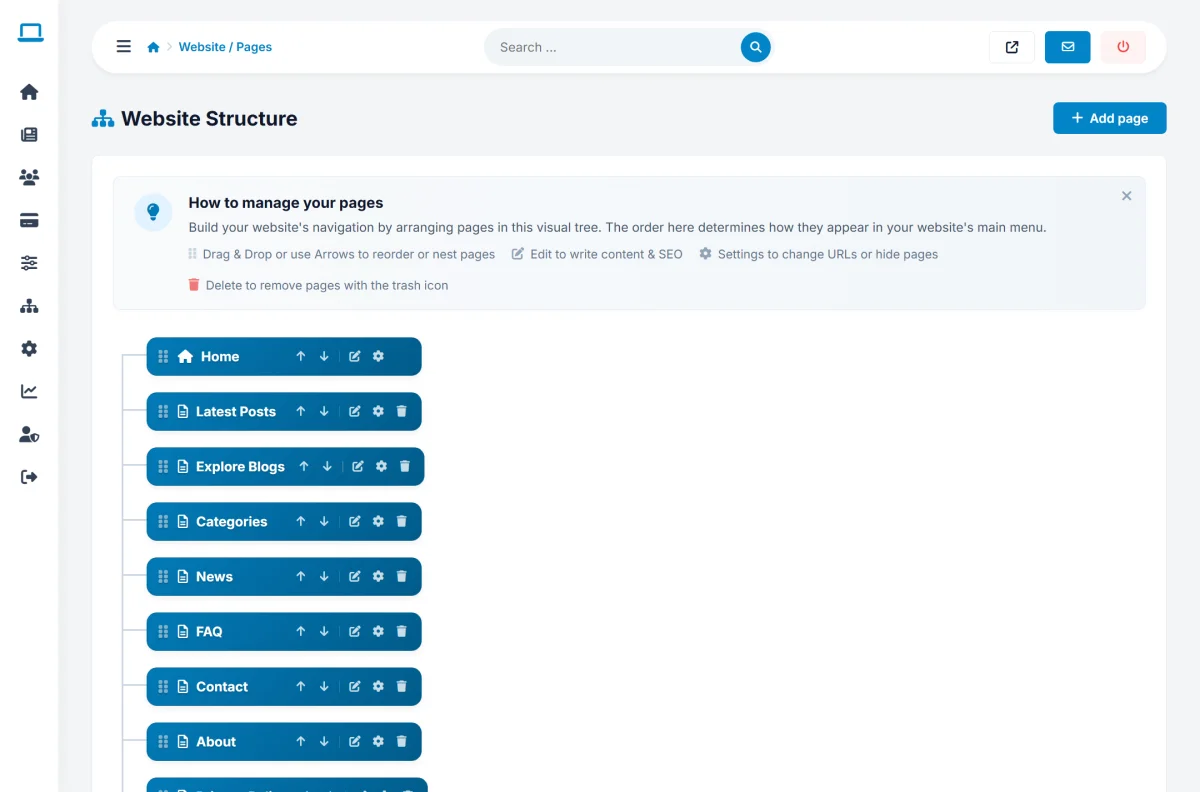
The main site structure and content are now managed in a clear visual tree. Drag and drop pages, or use the arrows, to reorder or nest them: the order of the tree is exactly the order of your website menu. Edit the content and SEO of a page, change its address or hide it from the menu, add new pages in seconds and remove the ones you no longer need. News, FAQ, Contact, Categories, Latest Posts and Explore Blogs are all just pages in the tree.
- Visual page tree: drag and drop or use arrows to reorder and nest pages
- The tree order is the order of the website menu
- Edit page content and SEO, change the page address, hide it from the menu
- Add and delete pages in a click; built-in pages (Home, News, FAQ, Contact, Categories...) included
- Also in the Website section: news articles, logo and favicon, appearance, templates, interface texts and advertisements
More Blog System features
- A brand new front-end, with 5 stunning templates to choose from
- AI blog search: just ask for what you want to read
- New Explore Blogs and Latest Posts pages with a powerful filter menu
- An entirely new administration panel, built on our latest platform
- New admin pages to manage blog posts, bloggers, comments and more
- An entirely new, much improved blogger panel