
SimplyHired Jobs Script is a lightweight, responsive PHP solution for displaying SimplyHired job listings on your website. Powered by SimplyHired’s job aggregation network, it pulls opportunities from thousands of sources across the web. The script is easy to integrate and can be used as a ready-made job display or as a base for working with the SimplyHired XML API.
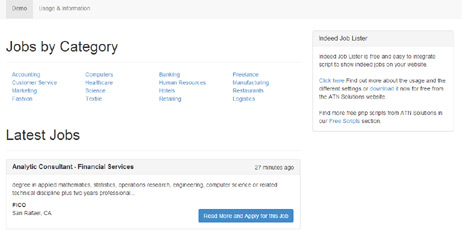
SimplyHired Jobs Script is a responsive, easy-to-integrate PHP script that allows you to display SimplyHired job listings directly on your website.
SimplyHired is one of the world’s leading job aggregators, collecting job opportunities from thousands of sources across the web, including job boards, newspapers, company career pages, social networks, and classified listings.
This script can be used as a ready-to-use job display solution or as a solid base for developers who want to integrate the SimplyHired XML API and build custom job listing features on their websites.
Information & Frequently Asked Questions
<?php
include("netart-simplyhired-jobs/jobs_category.php");
?>
<?php
include("netart-simplyhired-jobs/latest_jobs.php");
?>
<my_config>
    <configuration>
        <publisher_id>1555820896294234</publisher_id>
        <api_domain>jobsiteprofessional.jobamatic.com</api_domain>
        <date_format>m/d/Y</date_format>
        <timezone>Europe/London</timezone>
        <results_per_page>20</results_per_page>
        <latest_jobs_number>5</latest_jobs_number>
        <latest_jobs_default_category>Computers</latest_jobs_default_category>
    </configuration>
</my_config>
<job_categories>
    <category>Accounting</category>
    <category>Computers</category>
    <category>Banking</category>
    ...
</job_categories>
Browse the interface as a visitor or manage it as an administrator.
View the frontend and experience the script from a visitor's perspective.
Launch Frontend Demo ↗Preview the admin panel and explore the management features.
Choose the license that fits your project needs.
Perfect for a single professional website.
Unlimited websites for agencies and resellers.
Stop paying "software rent." With a single payment, you gain lifetime access to News Lister. No recurring fees, no subscriptions, and no hidden costs - just permanent value for your business.
We provide everything you need for a professional, worry-free launch.
100% unencrypted PHP code. You have total flexibility to customize and extend the script to match your specific vision.
Our expert team is standing by to assist with your setup, configuration, and any technical questions you may have.
Don't want to handle the tech? We will install the script on your server or hosting environment at no extra cost.
Keep your brand clean. We include the option to remove all "Powered by" references and links for a fully professional look.
Our PHP scripts share a harmonized architecture, allowing you to combine multiple products into a single, high-performance website. By combining them, you don't just launch a site - you can create a unique business model that strengthens your business and dominates your niche.
Your users enjoy a unified login experience across every feature of your portal.
Maintain a consistent professional look with shared templates and CSS styling.
Control your news feed, business directory, and e-commerce from one administrator dashboard.

We provide the technical foundation so you can focus on marketing.
Lightweight PHP code without heavy frameworks ensures your site loads fast and ranks higher on Google.
No encrypted files. You get full access to the PHP source code to customize it exactly as you need.
Built with security best practices to protect your data and your users against common web vulnerabilities.
Our team has been here for 20 years. We aren't going anywhere. We are here to help you succeed.