

Advertise events and sell tickets on your own platform
Launch an event marketplace where organizers advertise concerts, exhibitions and meetups and sell tickets, and visitors buy and print them online.

What is Event Portal and what makes it different from the other event classifieds scripts?
Event Portal is a a web software (php script), that can be used to create advanced and multi-user event listing and ticket selling websites.
It comes with an integrated web installer and can be installed easily on any PHP & MySQL enabled hosting package or also if you prefer, we can do the installation for you - it's a free service we offer.
Event Portal has many different features and functionality allowing to post event listings, accept and process online event registrations, sell tickets, create seat maps, create and print tickets for events, search and browse the events, filter the results and save the events, post recurring events, create event email alerts and many others.
The PHP script is also provided with the full not encrypted source codes (which allows you or developers working for you to further customize, add new features and customize it for different types of websites or web projects), free technical support and free installation service.
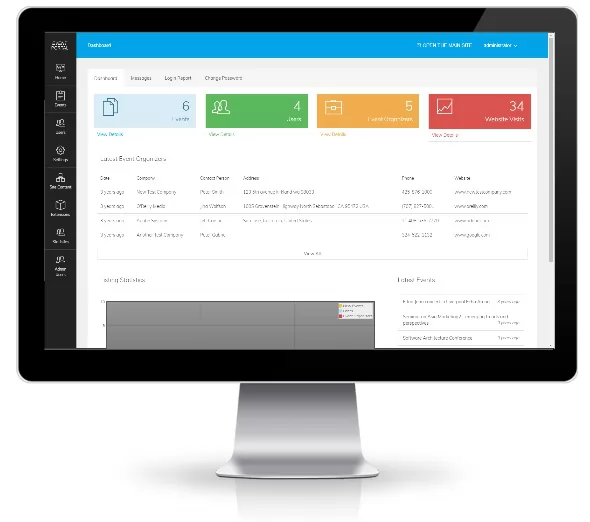
Event Portal is a complete web system having:
- a main website (front-end) on which the users can search and browse the events, sign up, register for events, buy tickets and others
- event organizers admin panel, which can be used by the registered event organizing company to post and manage their events, change the event registration and ticket selling settings, manage the sold tickets, process the event registrations etc.
- users admin panel, on which the registered users can see a history of their event registrations, purchase tickets, create event email alerts and manage their profile
- main administration panel for the website administrator to manage the different website settings, the registered users, the event listings, payment settings, subscriptions and packages, manage the website structure - edit the pages, add new pages, check the contact messages and many others.
New features added in version 2.0 of Event Portal
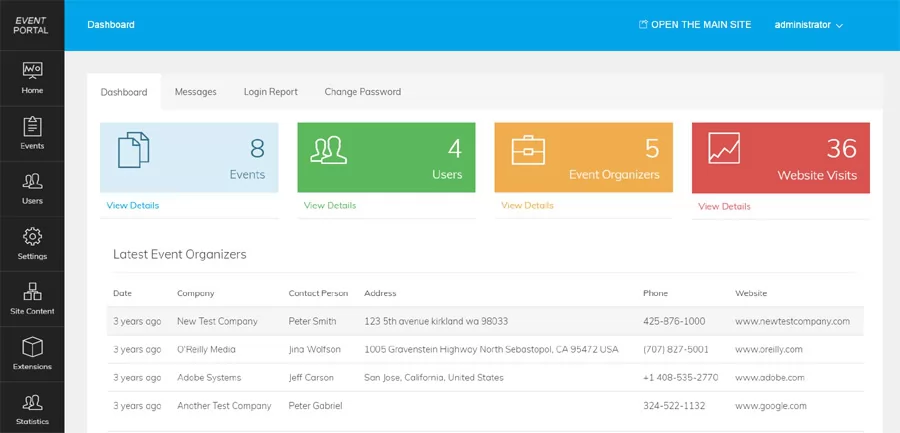
An entirely new administration panel
We redesigned completely the administration panel and its interface to make it better and easy to manage the website, users, event listings and the d…
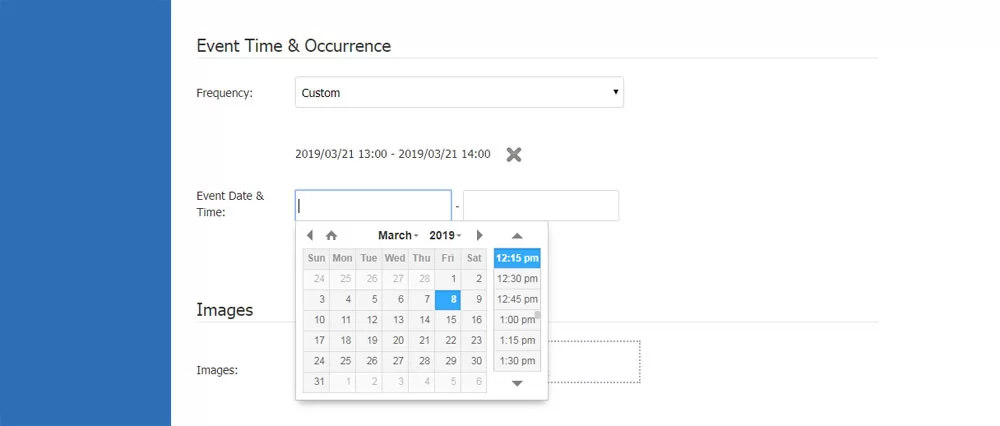
New functionality to post recurring events
This new functionality allows the event organizers to choose the event frequency and post a new listing and choose between the values - occurs once…

Different front-end improvements and updates
We moved the main menu in a top bar (which now frees more space and allows the administrator to add more custom pages if necessary) and the logo to t…
From idea to live website in three steps
Choose and try
Open the demo, test the public site and the admin panel, and ask us anything before you buy.
We install it for free
Our engineers set the software up on your hosting, usually within a few hours on business days.
Launch and succeed
Add your logo and colors, open your website and start earning from listings, memberships or ads.
Installation guarantee. If our team cannot install the software on your server, you get 100% of your money back.
Read the policy →Organizers sell tickets or take registrations online.
Visitors print tickets with unique barcodes.
Custom seat and ticket maps for each venue.
Subscriptions, direct payments or credits.
What your visitors will love
Comprehensive event listings
Organizers can create detailed event pages with descriptions, dates, and locations
Online ticket sales
Sell tickets directly through the site with secure payment processing and seat map creation
User-friendly admin panels
Separate dashboards for event organizers and attendees to manage listings and registrations
Event registration management
Track attendees, manage bookings, and handle cancellations efficiently
Customizable event categories
Organize events by type for easy browsing and searching
Responsive design
Ensures seamless access on any device, from smartphones to desktops
A complete event economy
For organizers
- Post and manage event listings
- Sell tickets or accept registrations
- Custom seat and ticket maps
- Manage applications online
For attendees
- Search events and subscribe
- Buy tickets securely online
- Print tickets with unique barcodes
- Newsletter with upcoming events
Turn event traffic into revenue.
Advertising fees
Charge organizers per listing or with a monthly subscription.
Featured events
Sell top spots on the home page and in search results.
Banner advertising
Sell banners to sponsors and partners, or run AdSense.
Event Portal questions
Do you provide the source codes? Are they encrypted?
Yes, we provide the source codes - not encrypted. This means that you or developers working for you could make modifications in them or add additional functionality on the website if necessary.
Can you do the installation on my server / hosting package and how much does it cost?
Yes, we can do the installation on your server or hosting package and this is a free service that we offer. We also always strive to do the installation as quickly as possible and most installations are done within an hour after a purchase. To request your free installation, please contact us before or after you have purchased the software. In order to do the installation for you, we'll need the ftp information for your website or if you have a hosting package control panel like cPanel or similar and is easier for you, you could send us instead the username and password for it.
Is your price one time fee, are there any monthly or other fees?
The software price is a one-time fee, once paid you could use the software for as many years as you wish without paying any other fees.
Can I do the installation myself? Is the installation difficult?
Yes, you can do the installation yourself and this is actually what most of our customers prefer. The software comes with an integrated web installer, which makes the installation easy - you only need to upload the files on your hosting package and run the web installer, which will create the database and configuration file for you.
If I choose you to do the installation for me, how fast can you do it?
We always make efforts to do the installation as fast as possible and it's usually done within 1-2 hours after the purchase. In some rare cases this may take longer, please don't hesitate to contact us for details and more information.
How can I monetize the event portal site?
The website powered by Event Portal offers different possibilities to monetize it and make money like for example:
- charge the event organizers fees for listing their events (you can choose between one of the 3 available payment methods - to charge them with subscriptions, to charge them based on credits or using direct payments and configure the option you prefer and accepted payment systems from the administration panel)
- charge fees to the users when uploading banners on the website (the administrator can create different banner zones, set different banner sizes and banner prices for them)
- charge fees to the advertisers when posting events
- charge subscription fees to the recruiting companies
- charge fees when making an event listing featured (the featured events show in the special featured events section and also always on top of the search results)
- earn money from adding other advertisements on the website like Google AdSense and similar
What are the different options / charging modes to charge the advertisers or event organizing companies for posting events on my site or using the other services?
Currently Event Portal has 3 different charging modes (which can be easily switched from the administration panel and the Payments section there) or alternatively the administrator can choose to run also a free site for the users.
- based on subscriptions / recurring payments
- based on credits
- direct payments
When you choose the subscriptions option you can create different subscriptions, for example:
- subscription #1 with price: $19.90 / mo allowing up to 25 listings, 0 banners and 0 featured listings (so the user selecting this subscription will pay $19.90 monthly fee with PayPal recurring payments and will be able to list up to 25 listings .. when he reaches this number, he will be asked to upgrade his subscription in order to be able to list more)
- subscription #2 with price let say: $49.90 allowing up to 500 listings, 1 banner and 10 featured listings etc.
So you may have as many subscriptions and set whatever pricing you prefer.
If you choose the second option to charge the advertisers based on credits, then the advertisers should buy credits (using one of the available payment options, such as PayPal with IPN, 2checkout, cheques and bank transfer) and after that they use these credits to pay for the services for the website. The advantage of this system is that since there are services for which the advertisers are charged very little amounts (like for example to open a user resume using the Search in the database with resumes functionality), they don't have to be redirected to external websites and make payments for such little amounts. Currently the advertisers can be charged when they use any of the following services: post event listings make selected event listings featured (they appear on top of the search results and appear with yellow background) upload job banners in different banner areas (the banner areas, their position, size of the banners and their price is set by the administrator) - the banners can be linked to the current event listings of the advertiser or an external link browse the database with the user resumes (the administrator can set a price for this service, per one resume opening)
When setting the direct payments option (3rd method) - you can set the price per job, featured job or resume view, so when posting a job the advertiser will directly see then a PayPal icon (or other option depending on the ones you have configured) to make his payment.
There is also an option to run a free site and with it the users can use freely the different services without being asked to make a payment. You can also switch at any time between the different payment options from the administration panel.
What are the script requirements? Are there any requirements for the PHP or MySQL version?
Since the script is written in PHP, in order to run it on your server or hosting package, you need to have PHP and MySQL installed on it, versions 5.2+ or higher (working fine with PHP 7+). Today it's almost impossible to find a Linux shared hosting package not supporting PHP, but if you have any doubts if your current hosting package has these, please don't hesitate to contact us and we'll test it asap for you.