AI settings
One screen connects the AI writing assistant and AI search to the provider of your choice.
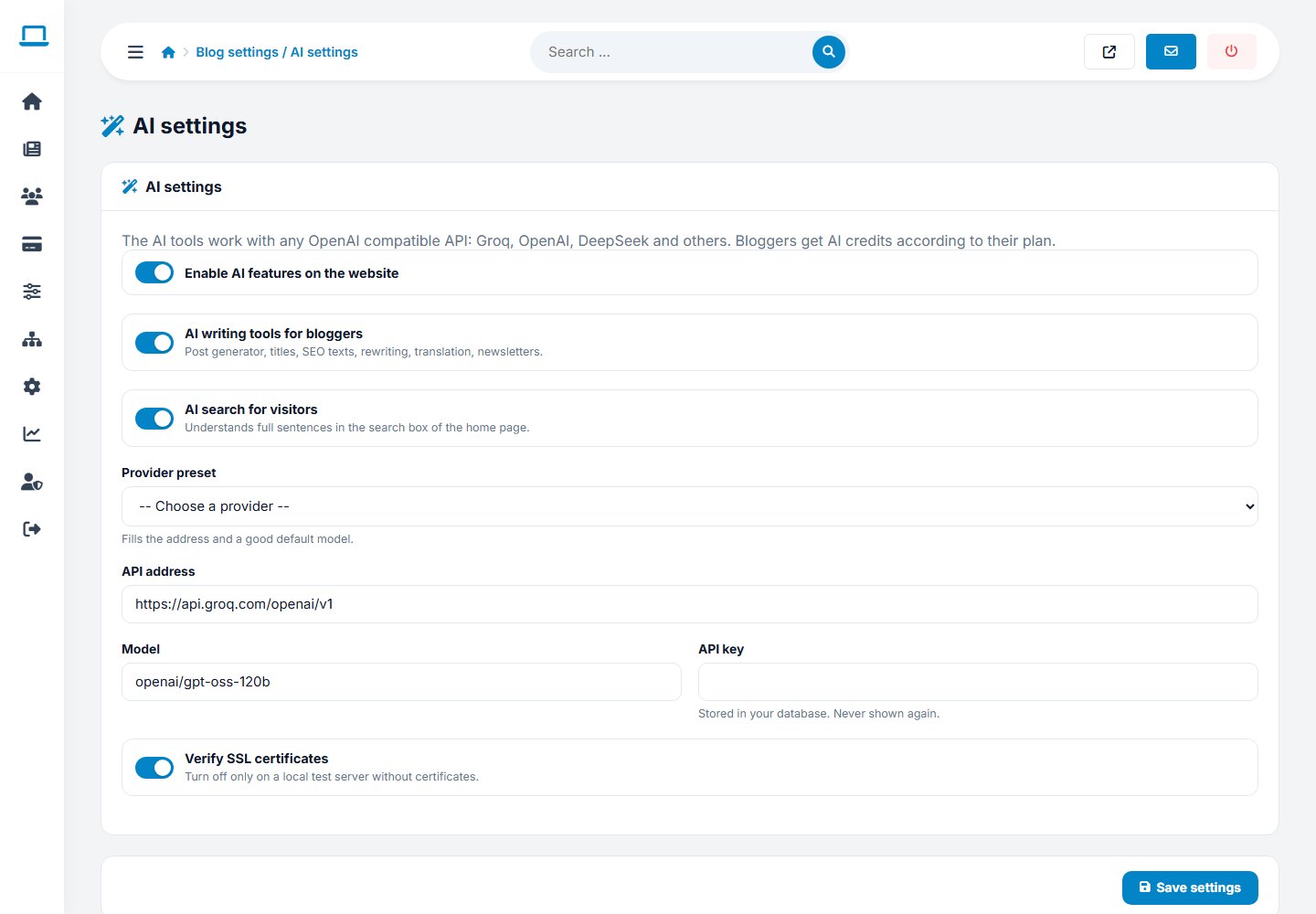
Setup
- Open Blog settings › AI settings.
- Choose a provider preset (Groq, OpenAI or DeepSeek) to fill in the API address and a default model, or type your own for any OpenAI-compatible service.
- Paste your API key.
- Switch on Enable AI, then AI writing assistant and/or AI search.
- Save and press Test connection. The page tells you whether the provider answered.
| Preset | API address | Default model |
|---|---|---|
| Groq | https://api.groq.com/openai/v1 | openai/gpt-oss-120b |
| OpenAI | https://api.openai.com/v1 | gpt-4o-mini |
| DeepSeek | https://api.deepseek.com | deepseek-chat |
Options
- Enable AI (master switch): turns every AI feature on or off.
- Enable AI posts: the writing assistant in the blogger panel.
- Enable AI search: sentence search for visitors.
- Verify SSL: keep this on; only switch it off on a local test server with certificate problems.
Controlling cost
Give each package a number of monthly AI credits in Packages. A free plan can have few credits while paid plans get more or unlimited.
SecurityThe key is saved in the database and never shown to bloggers. Generated HTML is sanitized before it reaches the editor.
Last updated