Appearance: template, colour and fonts
Make the website match your brand without touching any code.
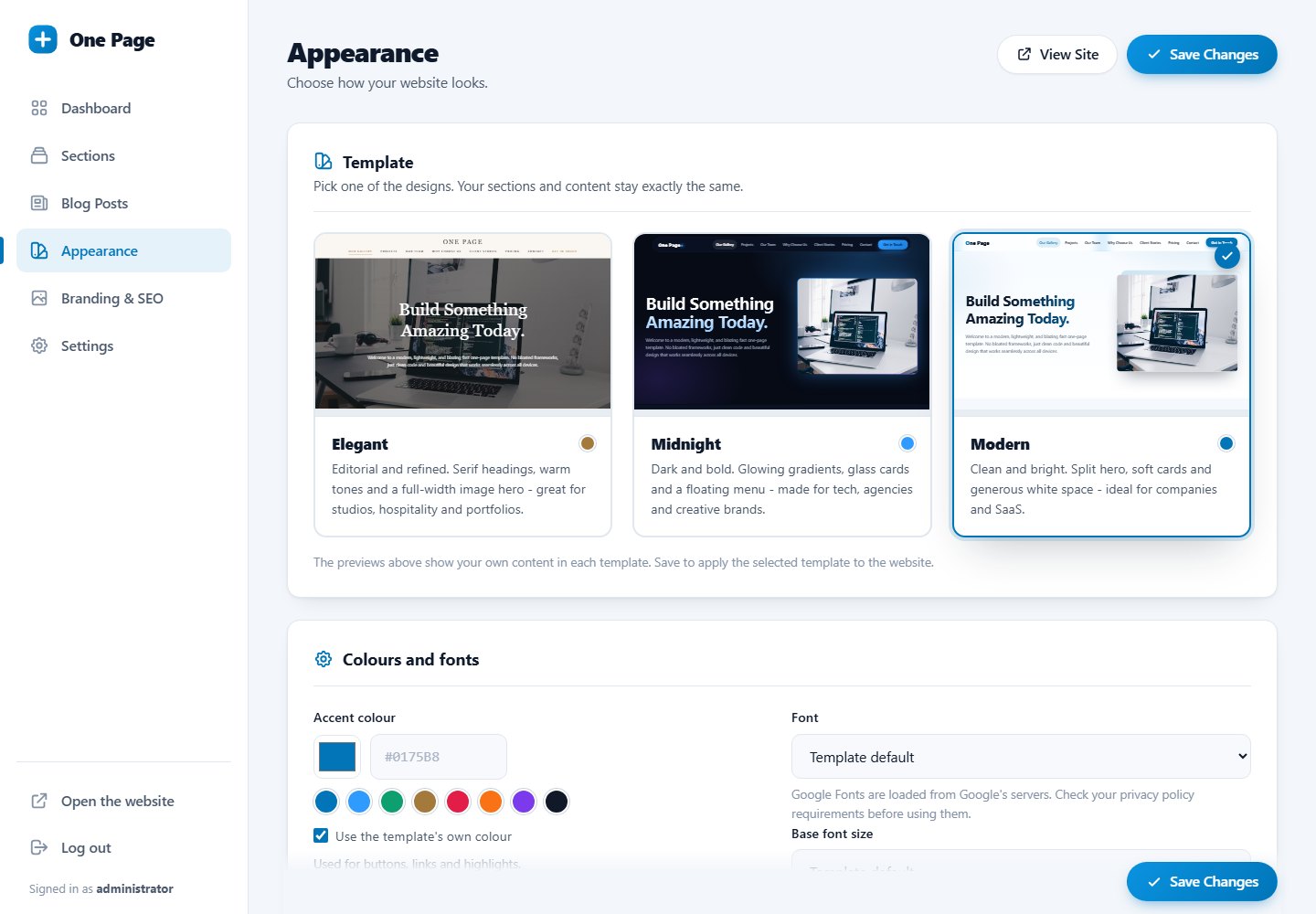
Template
Three cards show live previews of your own content in each template. Click one, then Save Changes. See choose a template.
Accent colour
The accent colour is used for buttons, links, icons, highlights and the call to action band.
- Click the colour square to pick a colour, or type a hex code such as
#0175B8. - Click one of the ready-made swatches.
- Tick Use the template's own colour to go back to the template's default.
Text colour on buttons is chosen automatically (white or dark) so it stays readable on your colour.
Font
| Group | Fonts |
|---|---|
| Template default | The font pairing designed for the template. |
| Safe fonts | System default, Arial, Verdana, Trebuchet MS, Georgia, Palatino. No external requests, fastest. |
| Google Fonts | Inter, Roboto, Open Sans, Lato, Montserrat, Poppins, Nunito, Playfair Display, Merriweather. |
Google Fonts are loaded from Google's servers. In some countries privacy rules require visitor consent for that. If in doubt, choose a safe font.
Base font size
Choose 14, 15, 16, 17, 18 or 20 px for the base text size. Headings scale with it.
Changes appear immediately
After saving, reload your website. If you still see the old look, clear the browser cache with Ctrl + F5.
Last updated