User manual · version 1.0
PHP Car Rental user manual
Everything you need to install, configure and run your car rental website: 49 illustrated topics for the website, the member panel and the admin panel.
1Getting Started
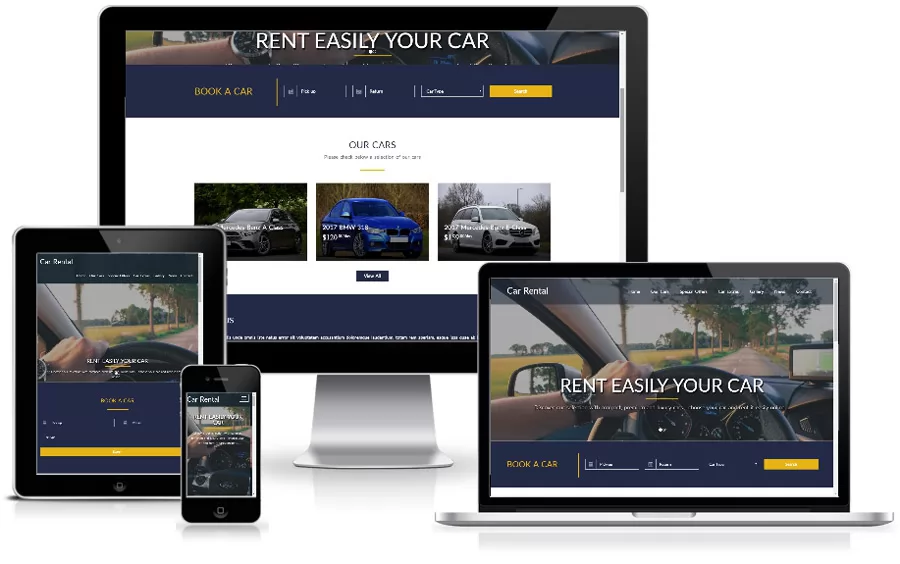
What is PHP Car Rental?PHP Car Rental is a car rental website script in PHP and MySQL with AI search, live pricing, bookings, user accounts.
InstallationInstall the PHP car rental script in minutes: server requirements, the web installer, manual SQL import, config.php settings and what to do after the...
Quick start checklistA ten-step checklist to launch your car rental website: log in, change the password, set the logo and colors, add cars, configure payments.
Folder and file structureUnderstand the PHP Car Rental file structure: index.php, include classes, extensions, templates, languages, ADMIN folder and the installer.
2Website (Front End)
The home pageTour the car rental website home page: hero section, search box, car categories, featured cars, how it works, locations.
AI car searchAI car search for a PHP car rental website: visitors type what they need in plain words and the script fills the filters. Works with Groq, DeepSeek.
Search and filtersCar search page of the PHP car rental script: filter by location, dates with real availability, type, brand, gearbox, fuel, seats, price and features.
The car pageThe car details page of the PHP car rental script: photo gallery with lightbox, specifications, features, rental terms, owner box, reviews.
Live pricingHow prices are calculated in the PHP car rental script: daily price, seasonal prices, 7 and 30 day discounts, optional extras.
The booking processHow customers book a car with PHP Car Rental: choose dates, send a booking request without paying, availability check.
Reviews and favoritesCustomer reviews with star ratings and moderation, plus a favorites heart button on every car, in the PHP car rental script. How visitors use them and how...
Languages on the websiteMulti-language support in the PHP car rental script: English and Spanish included, language switcher, translated pages, news, FAQ and car types.
Contact, FAQ, news and locationsContent pages of the PHP car rental website: contact form with spam protection, FAQ accordion, news blog, locations list and text pages like About us.
Registration and loginUser accounts in the PHP car rental script: registration, login, password reset by e-mail, profile editing and the session security that protects customers...
3Member Panel: Car Owners & Renters
Member dashboardThe member dashboard of the PHP car rental script: listing and view counters, pending booking requests, recent bookings and the My account menu for owners...
Posting a carStep-by-step guide to post a car for rent: car details, equipment, description editor, pricing rules, deposit, discounts.
AI listing generatorCreate a car rental listing with AI: type one sentence and the form is filled in, or generate a professional description from the car data. Works with Groq.
Managing listingsManage car listings in the member area: understand the statuses draft, pending, active, paused and expired, and how to edit, pause, resume, renew.
Booking requests and messagesHow car owners handle booking requests: see customer details, confirm, reject or complete bookings with automatic e-mails.
My bookings, favorites and profileFeatures of the renter account: track bookings and cancel them, saved favorite cars, payment history, profile data, preferred language and password change.
Paid listings and checkoutHow users pay to publish a car: choose a package, pay by card with Stripe, with PayPal or by bank transfer.
4Admin Panel
Admin login and dashboardLog in to the PHP car rental admin panel and learn the dashboard: active cars, listings awaiting approval, pending bookings, users, revenue.
Messages and login logsRead messages from the contact form of your car rental website and review the login log of the admin panel with date, username, IP address.
My account (password and language)Change the administrator password and the language of the PHP car rental admin panel from Home, My account. Includes password rules and why to replace the...
Managing carsManage all car listings in the admin panel: status tabs, search, approve or reject user listings, feature, pause, activate.
The car editorAdd or edit a car in the PHP car rental admin: details, AI-written description, features, prices, seasonal price ranges, photos with main image, status.
Managing bookingsManage all car bookings in the admin panel: filter by status, open the full booking details, confirm, reject.
Moderating reviewsModerate customer reviews of cars in the PHP car rental admin panel: approve, hide or delete reviews, with star ratings that update on the website...
Car types, brands and featuresSet up car types like Economy and SUV, brands and equipment features in the PHP car rental admin, with icons.
Extras, locations and couponsConfigure rental extras with per-day or fixed prices, pick-up and drop-off locations, and discount coupons with validity dates and usage limits in the car...
Website usersManage registered customers and car owners in the admin: search users, see their cars and bookings, block or unblock, edit profile data.
Payment settingsConfigure online payments in the PHP car rental admin: charge for listings, currency, Stripe Checkout keys and webhook.
Packages and transactionsCreate paid listing packages with price, duration, photo limit and featured status, then follow payments in the transaction log and approve bank transfers...
Pages and menuCreate and edit website pages in the car rental admin: rich text editor, titles and URLs per language, SEO meta tags, main and footer menu, order.
News and FAQPublish news articles and manage the FAQ of your car rental website: translations per language, summary, date, rich text content.
Logo, colors and brandingBrand your car rental website from the admin: website name, tagline, logo, favicon, main and accent colors, corner radius.
General settingsGeneral configuration of the PHP car rental script: company contact data, timezone, date format, cars per page, user listings, login to book.
AI settingsSet up AI in the PHP car rental admin: choose Groq, DeepSeek or ChatGPT, paste the API key, pick a model, enable the listing generator and AI search and...
E-mail and SMTPConfigure e-mail in the PHP car rental admin: sender name and address, PHP mail() or an SMTP server with SSL or TLS, so booking.
SEO, tracking and social mediaSEO and tracking settings of the car rental script: default meta description, Google Analytics, Facebook Pixel, custom head and body code.
LanguagesAdd and manage languages in the PHP car rental admin: enable the switcher, set the default language, create a new interface file and translate pages, news.
Traffic statisticsBuilt-in traffic report of the car rental admin: page views, unique visitors, views per day chart, most visited pages, referring websites.
Administrators, groups and permissionsManage administrators of the car rental admin panel: add staff, create groups like Fleet Manager and Content Editor.
5Customizing & Technical
Customizing the templateCustomize the PHP car rental template: template.html tags, CSS variables for colors, interface text keys, adding a new theme folder and custom tags loaded...
Adding modules and admin pagesDeveloper guide for the PHP car rental script: add a website module in the extensions folder, add an admin page with permissions.
SecuritySecurity of the PHP car rental script: CSRF tokens, prepared SQL statements, password hashing, login throttling, rate limits, safe uploads, filtered HTML.
Backup and moving to another serverHow to back up the PHP car rental script and move it to a new server: export the database, copy the files and upload folders.
Combining with other scriptsPHP Car Rental shares its core classes and admin panel structure with other NetArt Media scripts. Learn how the shared framework makes merging admin panels...
Troubleshooting and FAQFix common problems with the PHP car rental script: blank page, database connection error, images not uploading, e-mails not sent, SEO URLs not working.