AI listing generator
Writing a convincing ad is the hardest part of listing a car. The AI assistant removes it: it can fill the whole form from one sentence and write a polished description.
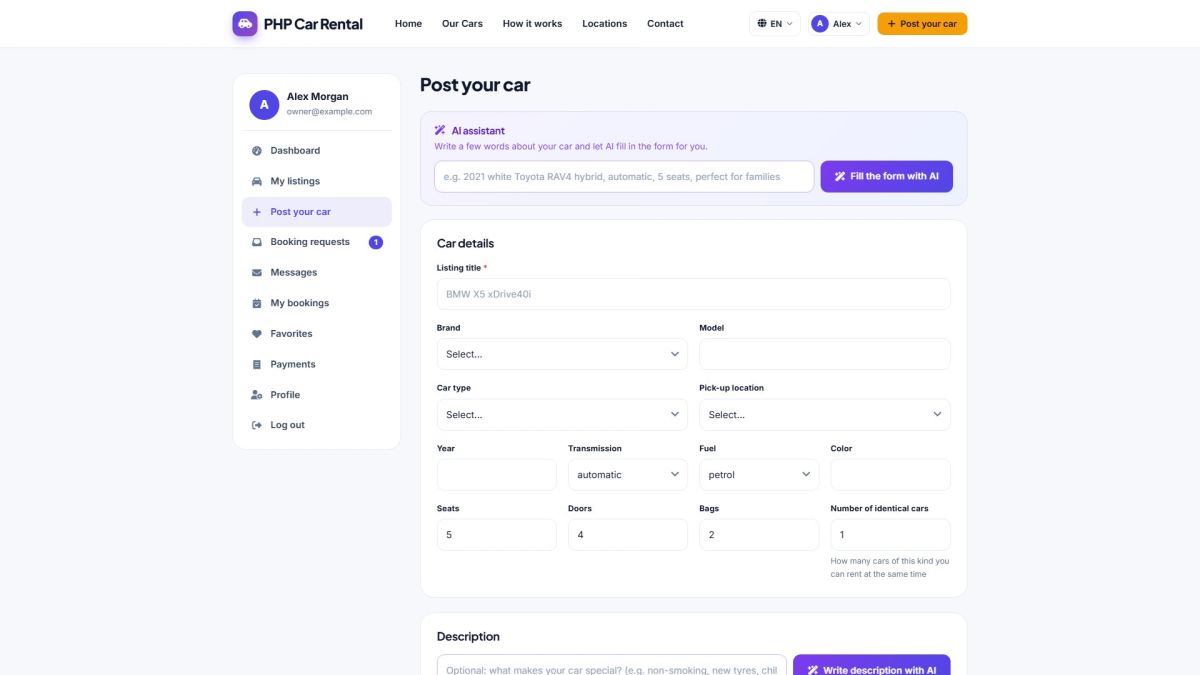
Option 1: fill the whole form from one sentence
- In the AI assistant box type a few words, for example: 2021 white Toyota RAV4 hybrid, automatic, 5 seats, perfect for families.
- Click Fill the form with AI.
- The title, brand, model, year, car type, gearbox, fuel, seats, doors, bags, color, matching features and a description are filled in.
- Read everything, correct what you like and add the price, the location and the photos.
Option 2: write only the description
- Fill in the car details and tick the features first.
- Optionally type a note in the field above the editor, for example non-smoking, new tyres, child seat available.
- Click Write description with AI. The editor receives a description with a short intro, a list of highlights and a closing line.
Good to know
- The text is written in the language the visitor is currently using on the website.
- The AI does not invent technical facts that you did not provide.
- Generated HTML is cleaned so that only simple formatting (paragraphs, lists, bold) is kept.
- Each user can make a limited number of AI requests per hour to protect your credits.
AI buttons work only after the administrator has entered an API key. See AI settings. Without a key users see a message that AI is not configured.
The same generator is available for administrators in the car editor (The car editor).
Last updated