Languages
English and Spanish are included. Adding another language takes a few minutes plus the time to translate.
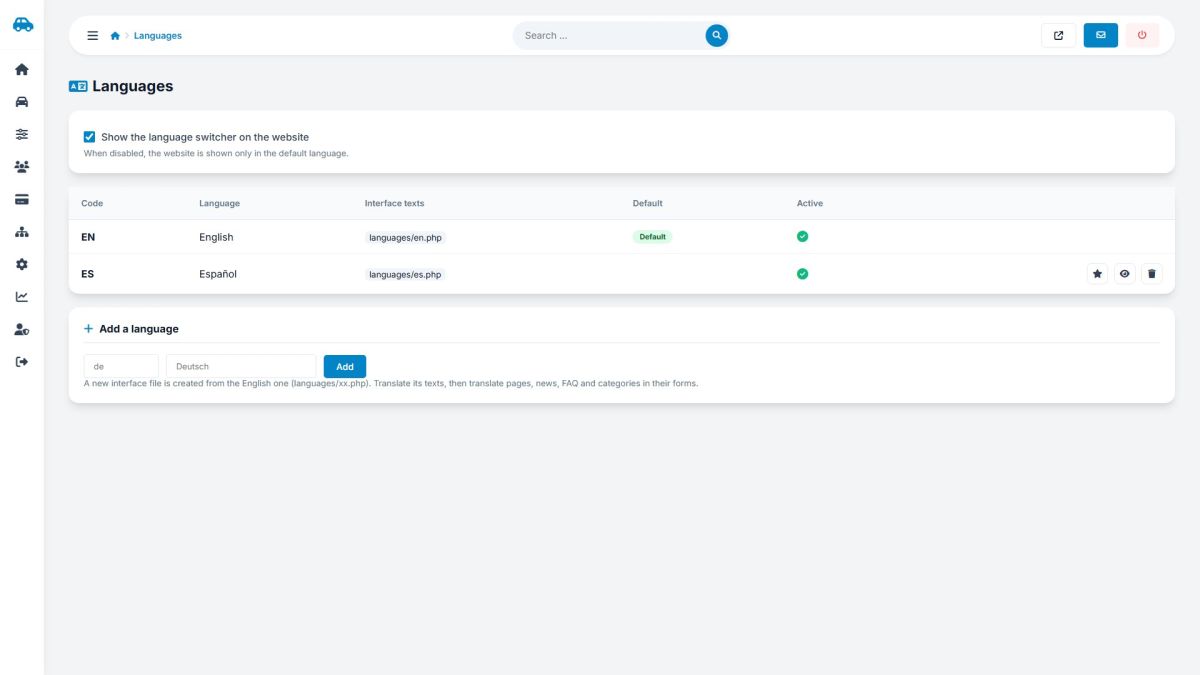
Add a language
- Enter a two-letter code (for example
de) and the name (Deutsch) and click Add. - The file
languages/de.phpis created as a copy of the English file. Open it and translate the values (the text after=>); never change the keys. - For the admin panel, copy
ADMIN/en.phptoADMIN/de.phpand add the code to the panel language list inADMIN/home/password.phpif you want it. - Translate your pages, news, FAQ, car types, features and extras: each form now has a tab for the new language.
Options
- Show the language switcher turns the multi-language mode on or off.
- The star makes a language the default (used when the visitor has not chosen one).
- The eye hides a language; the trash deletes it with all of its translations (English cannot be deleted).
Any missing text falls back to English, so you can publish a language before it is fully translated.
Last updated