Upload hotel photos and select facilities
Good photos and accurate facilities are the two things that make guests click "Book".
Photos of the property
Open My property → Photos. Press Choose files, select one or several images and press Upload.
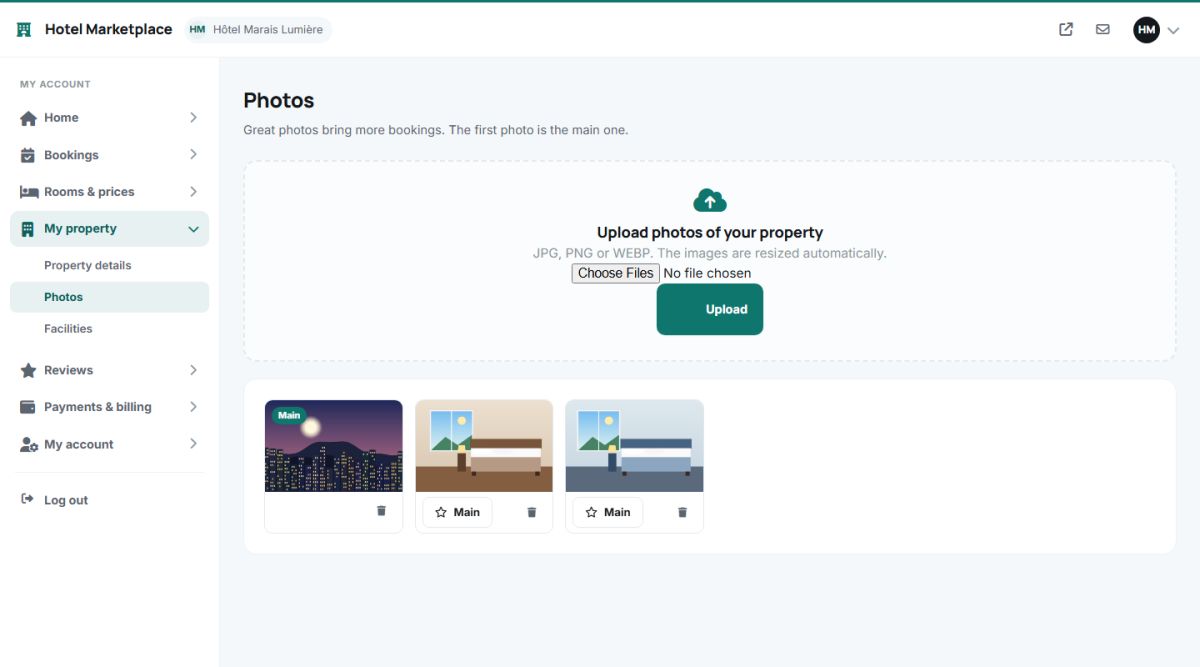
- Formats: JPG, PNG or WEBP.
- Automatic resizing: every photo is saved in two sizes, a large version (up to 1600 pixels) for the hotel page and a thumbnail (640 pixels) for the lists. Owners do not need to resize anything, and phone photos upload without problems.
- Main photo: the first photo has the green Main badge and is used on the cards and in search results. Use Main under another photo to promote it.
- Remove: the trash icon deletes a photo.
The photo gallery of the hotel page shows the main photo large and the next ones beside it, with a lightbox for all of them.
Recommend at least 8 photos: the facade, the lobby or common areas, the breakfast, the view and the rooms. The checklist on the dashboard asks for at least 3.
Facilities
Open My property → Facilities and tick everything the property offers: free WiFi, swimming pool, parking, restaurant, bar, spa, fitness centre, air conditioning, pet friendly, airport shuttle, elevator and so on.
- The icons of the selected facilities are shown in the Facilities section of the hotel page.
- Guests can filter the search results by facility, so a missing tick means a lost guest.
- Rooms have their own facilities (private bathroom, balcony, sea view...) that are set when adding or editing a room (Add rooms).
The list of available facilities is managed by you in the admin panel (Manage properties). If an owner asks for a facility that does not exist, add it there once and every owner can use it.
Last updated