Hotel search with filters, dates and real prices
The search checks availability for the chosen dates and shows the real price of the stay, including special offers, so guests never see rooms they cannot book.
Searching
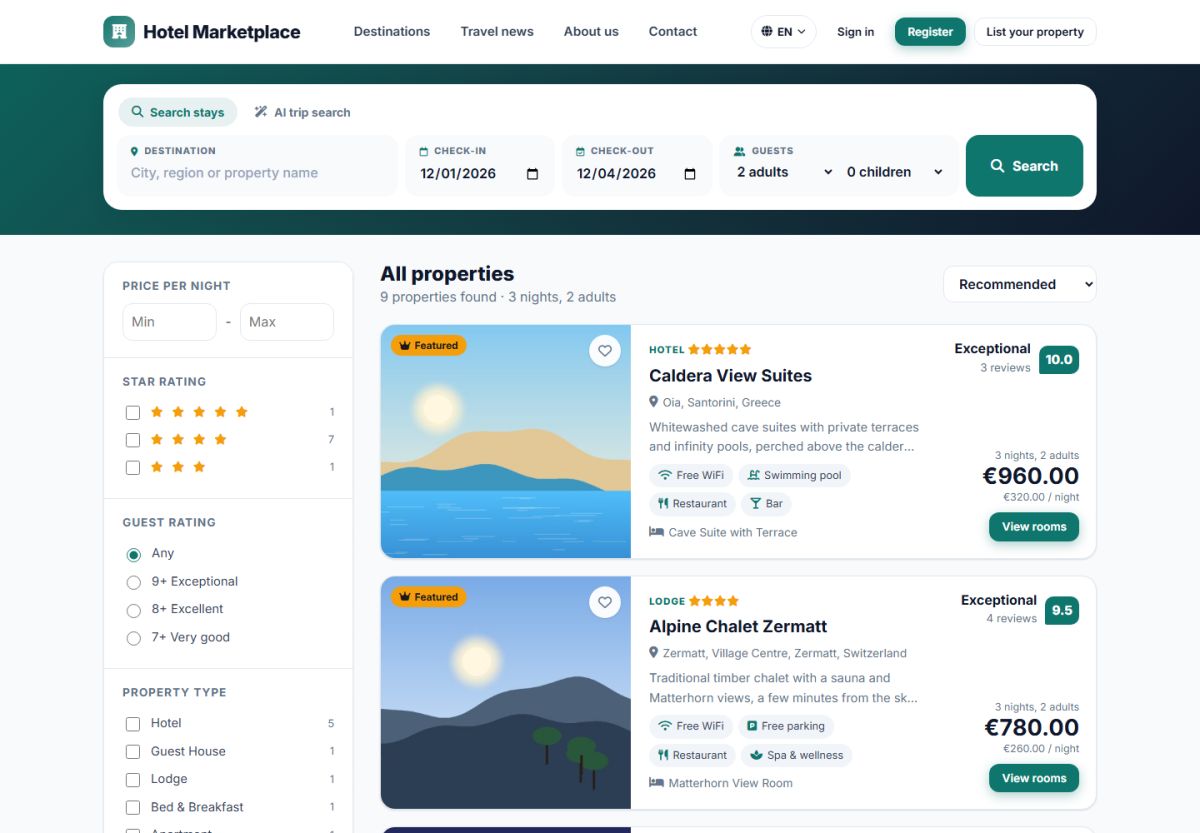
A visitor searches from the home page or from the form at the top of the results. The form has four parts:
- Destination: typing shows suggestions of locations and property names (autocomplete). Leave it empty to see all properties.
- Check-in and check-out: the dates of the stay.
- Guests: the number of adults and children.
When dates are chosen, the script checks availability of every room for every night. Properties that cannot host the stay are left out (or counted in a short note), and the others show the total price of the stay and the price per night.
Filters
| Filter | How it works |
|---|---|
| Price per night | Minimum and maximum. |
| Star rating | Choose one or more star classes. |
| Guest rating | Any, 7+ very good, 8+ excellent, 9+ exceptional. |
| Property type | Hotel, guest house, lodge, bed and breakfast, apartment, villa, resort, self-catering, campsite (editable in the admin panel). |
| Facilities | Free WiFi, swimming pool, parking, spa, pet friendly and many more (editable). |
The number next to each option tells how many properties match. Apply filters updates the list and Clear all filters resets it. On phones the filters open in a full screen panel.
Sorting and pages
Results can be sorted by Recommended (featured first), price low to high, price high to low, guest rating, stars or name. The number of results per page is set in Settings → Configuration options (default 12) and pagination is shown below the list.
Special offers on the cards
If the property has a special offer for the dates, the card shows an offer badge, the original price crossed out and a line such as You save €65.25. See Special offers.
Destinations
Clicking a destination (for example Paris) opens the results for that location. Destinations come from the tree described in Locations and the featured ones are managed in the admin panel under Properties → Destinations.
Visitors who prefer to write instead of filter can use the AI trip search.
Last updated