User manual · version 2.0
PHP Poll user manual
Everything you need to create polls, collect votes and embed them on any website with the PHP poll script that needs no database. 42 step-by-step guides.
1Getting started
What is PHPPoll? Overview of the PHP poll scriptPHPPoll is a PHP poll script with no database. Learn what it does: five poll types, live charts, statistics, embeds for any website and a modern admin panel.
System requirementsWhat you need to run PHPPoll: PHP 7.3 or newer with SimpleXML and mbstring, writable folders and any shared hosting. No MySQL or database required.
How to install the PHP poll scriptStep-by-step PHPPoll installation: upload the folder, set permissions, run the first-start wizard and create your administrator account. No database needed.
Create your first pollQuick start guide: create a poll from a template, preview it live, publish it and embed it on your website with PHPPoll. Follow the steps and be online in minutes.
Upgrade from PHPPoll 1.xMove from PHPPoll 1.x to 2.0: import your old polls and votes with the built-in import tool, and learn what is converted and what you need to set up again.
2Front-end (visitors)
The standalone poll websitePHPPoll includes a ready poll website that lists your open and past polls with your logo, tagline and share buttons. Learn how to configure it and get pretty links.
How visitors voteSee the voting experience: choose an answer, send the vote and see instant results. Covers single, multiple, image, rating and NPS polls and extra fields.
Poll results for visitorsControl when visitors see poll results: always, after voting, after the poll closes or never. See how the live result charts and messages look for your voters.
Prevent duplicate votes and spamHow PHPPoll stops repeated and fake votes: cookie and IP limits, repeat voting after N hours, math captcha, honeypot and bot filter. IP addresses are never stored.
Mobile, dark mode and themesPHPPoll polls and the admin panel are fully responsive. Learn about light, dark and automatic themes, accent colors and how polls look on phones and tablets.
3Admin panel
Admin panel login and accountHow to log in to the PHPPoll admin panel, change your username and password, log out safely and what protects the login: hashing, lockout and CSRF tokens.
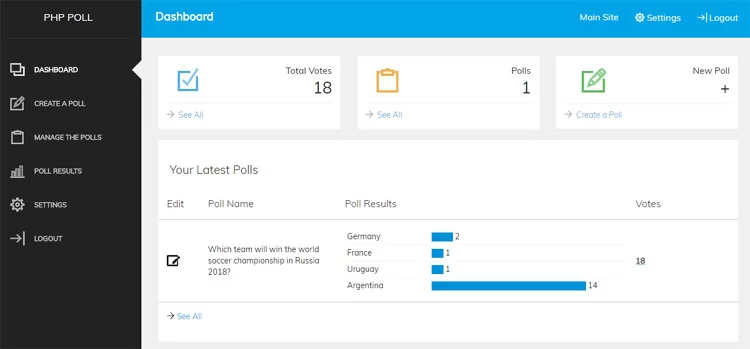
The admin dashboardA tour of the PHPPoll dashboard: total votes, weekly trend, active polls, 30-day activity chart, top polls, recent votes and quick-start templates.
Manage your pollsUse the My polls page to search and filter polls, open results, edit, share, duplicate, close, reopen or delete a poll. Learn what each poll status means.
The poll editorA guide to the PHPPoll poll editor with live preview and four tabs: Question, Appearance, Voting rules and Messages and data. Create any poll quickly.
Poll types: which one should you use?Compare the five poll types of PHPPoll: single choice, multiple choice, image choice, star rating and NPS 0-10. Learn when to use each type for your survey.
Single and multiple choice pollsCreate single choice and multiple choice polls with PHPPoll. Set options, an Other answer, minimum and maximum choices, shuffled order and result sorting.
Image pollsCreate an image poll with PHPPoll: upload pictures or use image URLs, set one or several choices, and show results as charts. Ideal for logos, designs and photos.
Star rating pollsAdd a star rating poll to your website with PHPPoll. Choose 3 to 10 stars, collect ratings and see the average score and the distribution in live results.
NPS (Net Promoter Score) pollsRun a Net Promoter Score (NPS) survey with PHPPoll. Collect 0-10 ratings, get automatic promoter, passive and detractor percentages and the NPS score.
4Poll options
Poll appearance settingsStyle every poll to match your website: light, dark or automatic theme, accent color, rounded corners, button text, chart type, result sorting and vote numbers.
Voting rulesConfigure who can vote and when: poll status, maximum votes, opening and closing dates, duplicate vote protection, captcha and the visibility of the results.
Schedule polls and set end datesSchedule online polls in PHPPoll with an opening date, a closing date and a vote limit. Learn how scheduled, ended and full polls behave for visitors and admins.
Results visibility settingsDecide when voters may see poll results in PHPPoll: always, after voting, after the poll closes, or private for admins only. Compare the options for your use case.
Collect voter details and commentsAsk voters for a name, an email address or a comment together with their vote in PHPPoll. Set each field to off, optional or required and review the answers.
Thank-you message, redirect and closed messageCustomize what happens after a vote in PHPPoll: write your own thank-you message, redirect voters to another page and set a message for closed polls.
5Results & statistics
The results pageRead your poll results in the PHPPoll admin: total votes, leading answer, chart switcher, status, last vote, actions menu to close, reset, print or delete a poll.
Chart types for poll resultsPHPPoll draws poll results as animated bar, column, donut or pie charts without any chart library. See examples and learn how to choose the best chart style.
Poll statistics and individual votesGo beyond the percentages: PHPPoll shows votes over time, the desktop/mobile/tablet split, the websites where a poll is embedded, comments and every single vote.
Export poll votes to CSVDownload all votes of a poll as a CSV file that opens in Excel or Google Sheets. See which columns are exported and how PHPPoll protects against formula injection.
7Settings & maintenance
SettingsAll PHPPoll settings explained: site name, logo, language, time zone, default theme, public site, pretty URLs, notifications, account and system check.
Translate PHPPoll into your languageTranslate the PHPPoll admin panel and poll texts into any language by copying one language file. Step-by-step guide with placeholders, fallback and tips.
Email notifications for new votesReceive an email when someone votes. Set the admin email, switch notifications on globally and per poll, send a test email and fix mail problems on your server.
Backup, restore and moving to a new serverDownload a full XML backup of all PHPPoll polls and votes, restore it on any server, delete all votes and learn what to copy besides the backup file.
Security and privacyHow PHPPoll keeps your polls secure and your voters private: protected data folder, hashed passwords, CSRF tokens, safe uploads, anonymous IP hashes and server tips.
Customize the poll scriptPHPPoll uses plain PHP functions, so it is easy to change. Learn the file structure, how to edit CSS and texts, add admin pages and use config.php options.
8Help
TroubleshootingSolutions for common PHPPoll problems: settings not saving, wrong embed URLs, pretty links 404, no emails, "already voted" messages, blank pages and upload errors.
Frequently asked questionsFrequently asked questions about PHPPoll: database, votes limit, multiple polls, WordPress, GDPR, translations, moving servers, customization and poll types.