NPS (Net Promoter Score) polls
Run a Net Promoter Score (NPS) survey with PHPPoll. Collect 0-10 ratings, get automatic promoter, passive and detractor percentages and the NPS score.
Net Promoter Score is the classic customer-loyalty question: "How likely are you to recommend us to a friend or colleague?" answered on a scale from 0 to 10. PHPPoll shows the scale to your visitors and calculates the NPS for you.
Create an NPS poll
- Click Create poll and select NPS 0-10 (or the Net Promoter Score template).
- Edit the question if you like.
- Optionally set the labels below the left and right end of the scale, such as "Not likely" and "Very likely".
- Save the poll.
How the NPS is calculated
| Group | Answers |
|---|---|
| Detractors | 0 to 6 |
| Passives | 7 and 8 |
| Promoters | 9 and 10 |
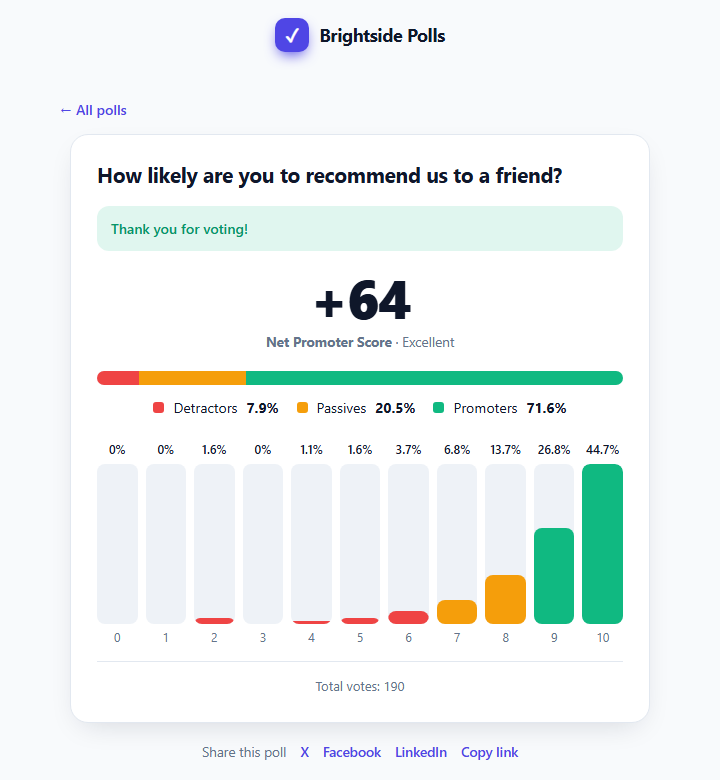
NPS = % promoters − % detractors. The result ranges from −100 to +100. PHPPoll adds a label: Excellent (50 or more), Great (30–49), Good (0–29) or Needs improvement (below 0).

Reading the results page
- A large score and its label.
- A colored bar with the share of detractors, passives and promoters.
- A column for each value 0–10 with its percentage.
- The admin stat card shows the score together with the promoter and detractor percentages.
Good practice
- Set results to Only me (admin) if you do not want to publish your score. See Results visibility settings.
- Add an optional comment field to ask "What is the main reason for your score?". See Collect voter details and comments.
- Run the same poll again every quarter (duplicate it) and compare the scores. See Manage your polls.
Last updated