Poll results for visitors
Control when visitors see poll results: always, after voting, after the poll closes or never. See how the live result charts and messages look for your voters.
For every poll you decide who can see the results and when. This setting is in the poll editor under Voting rules → Who can see the results.
The four visibility modes
| Mode | Behavior for visitors | Good for |
|---|---|---|
| Always visible | A View results link is shown next to the Vote button, so people can look before voting. | Fun polls, quick opinion polls |
| After voting | The results appear once the visitor has voted. Closed polls show results to everyone. | Most polls (default) |
| After the poll closes | Results stay hidden until the poll is closed, ended or full. | Contests, unbiased research |
| Only me (admin) | Visitors never see results. You see them in the admin panel. | Private feedback, NPS surveys |
What the results look like
The visitor sees the chart you selected for the poll (bars, columns, donut or pie), the percentage of each option and, if enabled, the number of votes. A total is shown at the bottom. Charts animate smoothly and are drawn in pure CSS and SVG, so no external library is loaded.
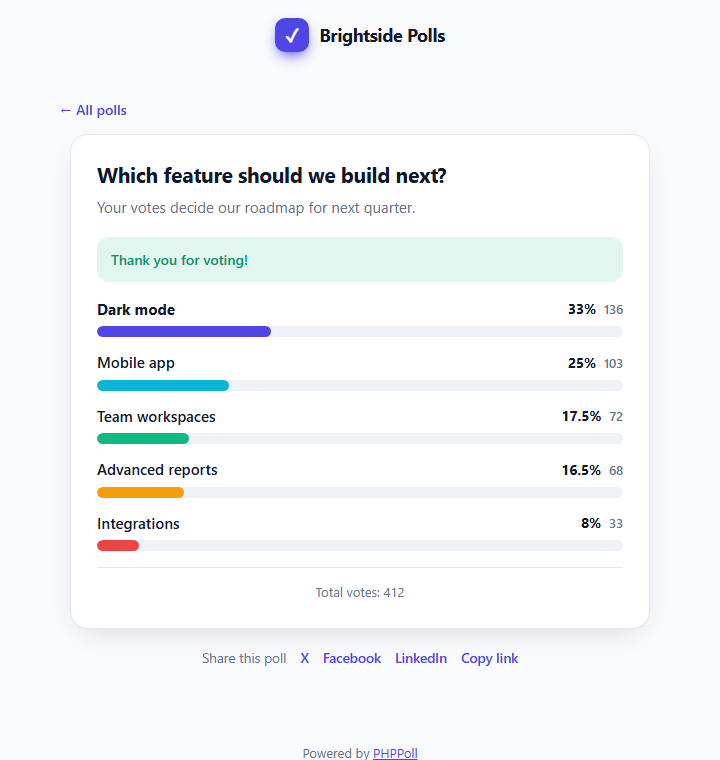
Hiding the vote numbers
In Appearance you can switch off Show vote numbers to show only percentages. See Poll appearance settings. Ratings and NPS polls show an average score or the Net Promoter Score instead of a list of percentages. See Star rating polls and NPS (Net Promoter Score) polls.
Messages shown to visitors
- "Results are shown after you vote."
- "Results will be published when the poll closes."
- "The results of this poll are private."
- A custom message for closed polls, which you can write yourself. See Thank-you message, redirect and closed message.
Choose After voting or After the poll closes when you want honest answers: people are not influenced by what others voted.
Related: Results visibility settings.
Last updated