Editing Categories and Locations
Categories and locations are stored in simple text files, one line per item, so they are quick to edit and easy to translate.
Categories
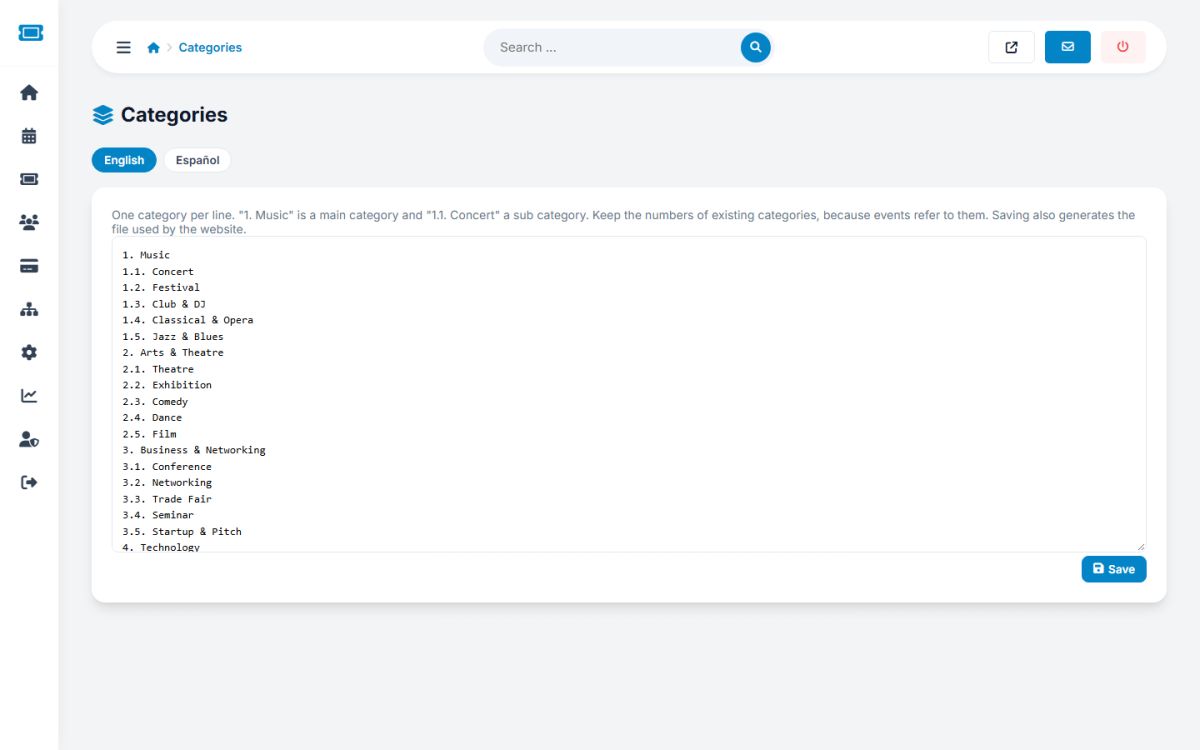
Open Events → Categories, choose the language tab and edit the text. The format is:
1. Music
1.1. Concert
1.2. Festival
2. Arts & Theatre
2.1. Theatre
A number without a dot (1.) is a main category, and 1.1. is a sub category of it. The default list has 9 main categories with 35 sub categories: Music, Arts and Theatre, Business and Networking, Technology, Sports and Fitness, Food and Drink, Education and Workshops, Family and Kids, Community and Charity.
- Keep the numbers of existing categories. Events refer to them by number. You may rename a category freely, but changing a number moves its events to another category.
- Add new categories with the next free number.
- Every language has its own file. Keep the same numbers in all of them.
After saving, the portal rebuilds the file used by the website. The category icons on the website follow the main category number.
Locations
Events → Locations works the same way with countries (229. United States) and their regions or cities (229.6. California). The default file contains many countries and cities. The location field in the event form and in the search offers these places as suggestions.
- Add the cities of your region by adding lines under the right country number
- Never reuse or renumber an existing line, because events and organizers store the number
- Visitors can also search by the free City field, so a missing city is not a blocker
Both pages write files. If you see a message that a file cannot be written, set write permission on the categories or locations folder. See The configuration file.
Last updated