How to Install Event Portal
Installing Event Portal takes a few minutes: upload the files, enter your database details and run the web installer.
Server requirements
- PHP 7.4 or newer (PHP 8.x recommended)
- PHP extensions:
pdo_mysql,curl,mbstring,gd - MySQL 5.7+ or MariaDB 10.3+
- Apache with
mod_rewriteis optional, needed only for pretty event URLs - An SSL certificate (https) is strongly recommended, and required by Stripe and PayPal on a live site
Install step by step
- Upload the files. Copy the whole
EventPortalfolder to your hosting, either to the root of your domain or to a sub folder. - Create a database. In your hosting control panel create an empty MySQL database and a user with full rights to it.
- Edit
config.php. Enter the database host, user, password and name. The details are explained in The configuration file. - Make folders writable. Set write permission (usually 755 or 775) on
uploaded_images,thumbnails,categories,locationsandlanguages. - Open the installer. Go to
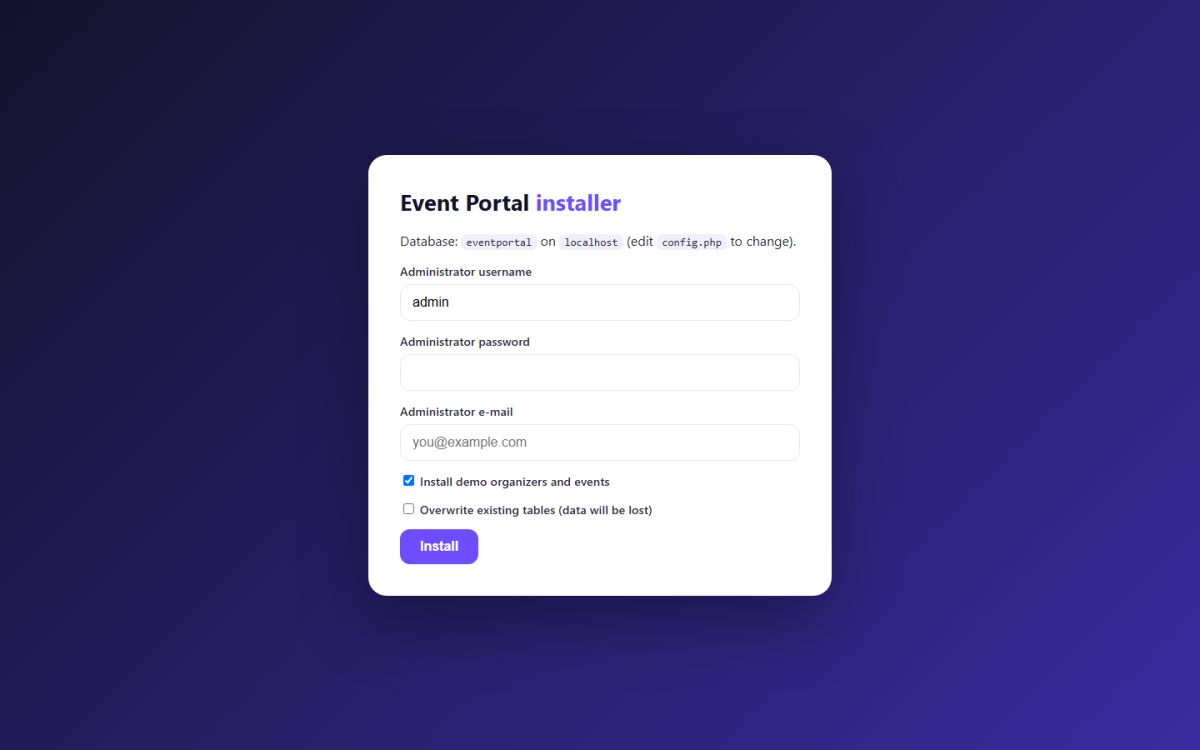
https://your-domain/install.phpin the browser. - Fill in the form. Choose an administrator username, a strong password and your e-mail. Tick Install demo organizers and events if you want sample content to explore.
- Press Install. The installer creates the tables, the first administrator account, the default pages, packages and settings.
- Delete
install.php. This is important for security.
Delete install.php immediately after the installation, and set $DEBUG_MODE = false; in config.php on a live website so visitors never see PHP errors.
First login
Open https://your-domain/ADMIN/ and sign in with the username and password you chose. The Administration panel overview shows what to configure first.
Installing from the console
If you have SSH access you can run the installer without a browser:
php install.php admin YourPassword you@example.com 1
The arguments are the administrator username, password, e-mail and 1 to install demo data (0 for an empty site).
Demo data
With demo data the installer creates three organizers, one attendee and twenty events across all categories. Demo accounts use the password demo1234. Delete the demo organizers and events from the administration panel before you go live. See Manage users and Manage events.
Reinstalling
If the tables already exist the installer refuses to continue. Tick Overwrite existing tables only on a test site, because it deletes all data.
Last updated