Custom fields and field values
Collect the extra information your niche needs without changing any code.
Custom fields
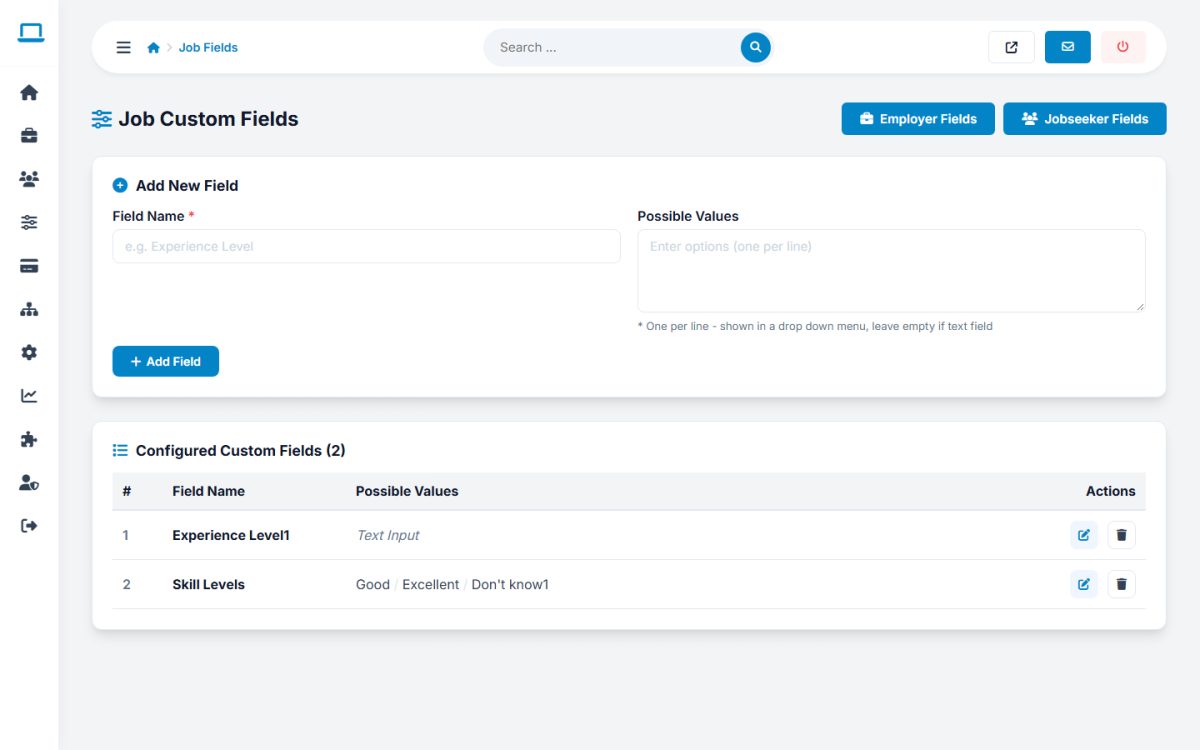
There are three field sets: Job Fields (Job Listings → Job Fields), Employer Fields and Jobseeker Fields (Users menu). The pages have the same form:
- Enter the Field Name, for example Experience Level.
- In Possible Values enter one choice per line to create a drop-down list, or leave it empty for a text field.
- Press Add Field. Use the pencil icon to edit and the trash icon to delete a field.
Job fields appear in the job forms and on the job page. Employer and jobseeker fields appear in the registration forms and profiles.
Field Values
Job Settings → Field Values edits the standard lists used across the site, in the format ID-Value;ID-Value:
| List | Used for |
|---|---|
| Job Types | Full time, contract, part time, internship, temporary |
| Experience Levels, Availability Values | Jobseeker preferences and CV search |
| Education Levels, Course Study Modes | Resume education and CV search |
| Resume Languages, Language Proficiencies | Resume languages section |
Values such as M_FULL_TIME are translation keys, which means they are translated automatically in each language. You can replace them with plain text if you use only one language, for example 1-Full Time;2-Contract. Do not change the IDs of values already in use.
Last updated