Posting a job
Posting a job takes a few minutes, and the built-in AI assistant can write the description for you.
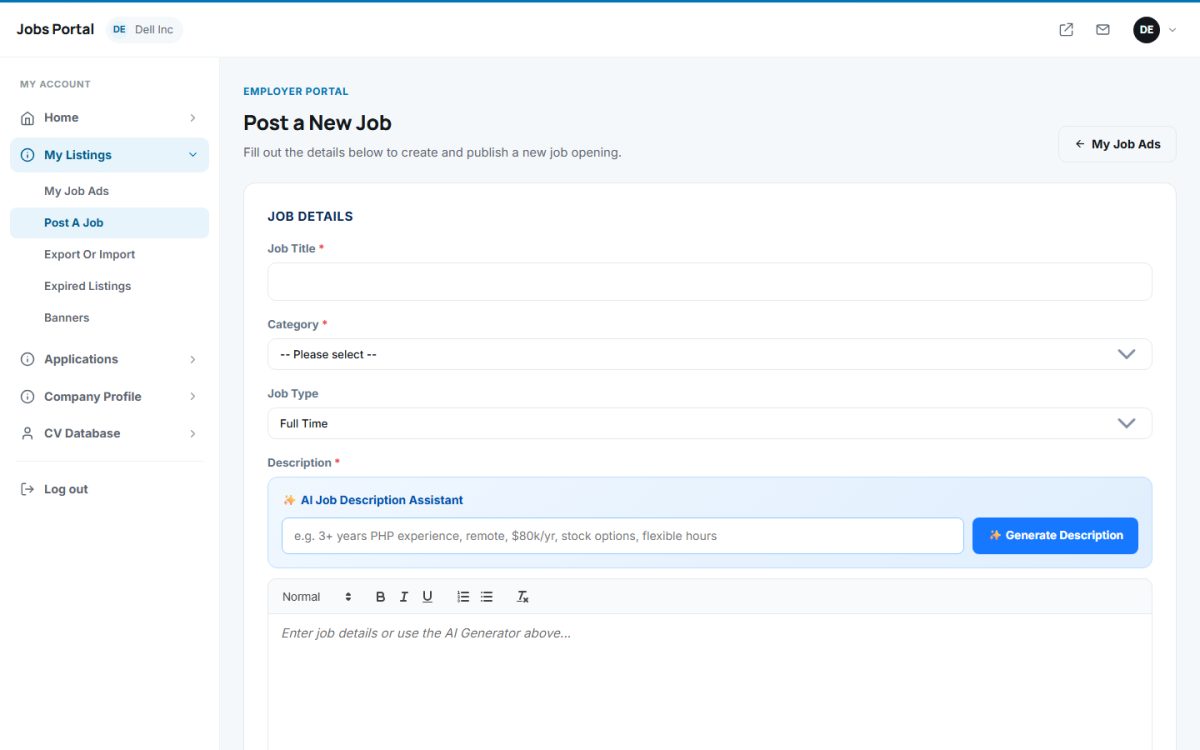
Step by step
- Open My Listings → Post A Job (or press Create Job Listing on the dashboard).
- Fill in the Job Details: title, category (the lists open as you choose a category), job type (full time, contract, part time, internship, temporary).
- Write the Description with the rich text editor – or use the AI assistant below.
- Add Location & Salary: location, ZIP, salary, job start date and an application URL if candidates should apply on your own site.
- Add Media & Attachments: an image and an optional PDF.
- Optionally tick Post this job anonymously to hide the company name.
- Optionally add screening questions (see below).
- Press Submit.
AI Job Description Assistant
Type a few notes in the AI box, for example “3+ years PHP experience, remote, $80k/yr, stock options, flexible hours”, and press Generate Description. The assistant writes a structured description with an overview, responsibilities and benefits and inserts it in the editor, where you can still change it. The button is available when the administrator has enabled AI configuration.
Screening questions
Add screening questions for applicants lets you ask questions that candidates answer when they apply, for example “Do you have a driving license?”. Enter the question and, in the answers field, the choices (one per line) – or leave the choices empty for a free-text answer. You see the answers in the application details.
What happens after you submit
- If the administrator uses Manually Approve New Jobs (settings), the ad waits for approval; otherwise it goes live immediately.
- The ad stays online for the number of days set in Jobs Expire Time.
- Depending on the charging method, posting uses one of your free jobs, a package credit, a subscription slot or credits. If you cannot post, the page tells you what to buy first, see packages and payments.
- To make the ad stand out, make it featured, see managing job ads.
Last updated