Managing job ads
The My Job Ads page is the central place for everything that concerns the ads you have posted.
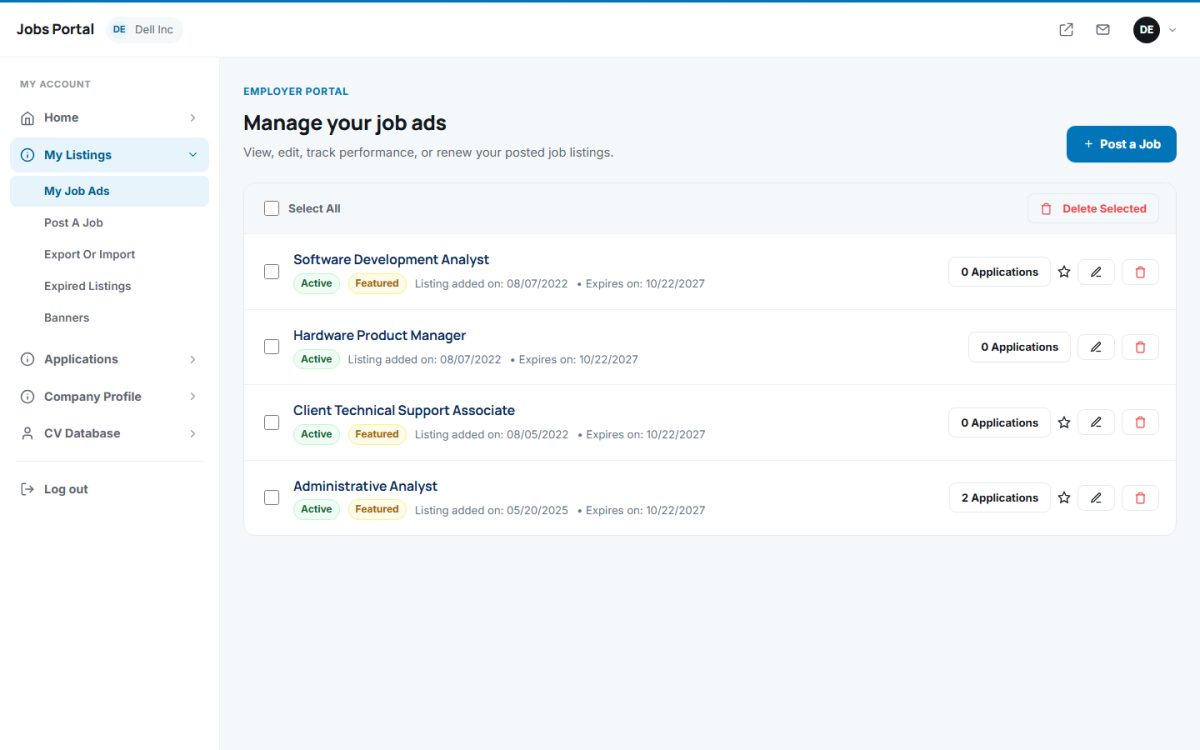
The ads list
Each ad shows its title, status (Active), the Featured badge, the date added, the expiry date and the number of applications. The title opens the public job page. Icons on the right let you:
- View applications of the ad.
- Edit the ad (title, description, category, salary, PDF, status and more).
- Delete the ad – its applications and screening questions are deleted too.
- Remove the featured status.
Select several ads with the checkboxes and use Delete Selected for bulk removal.
Making an ad featured
Featured ads are shown first and with a badge on the home page and in search results. In the edit form press Make Featured. Depending on your plan this uses a featured slot from your package or subscription, or costs credits (the price is shown before you confirm). The featured period is set by the administrator.
Expired listings
My Listings → Expired Listings lists ads whose time has run out. For each one you can Renew it (it is posted again with a new date and expiry, and uses a package slot, subscription slot or credits like a new ad) or delete it.
Applications per ad
The Applications number links to the list of candidates filtered by that job.
Last updated