Banner advertising for employers
Banners give employers extra visibility, and give you another source of revenue.
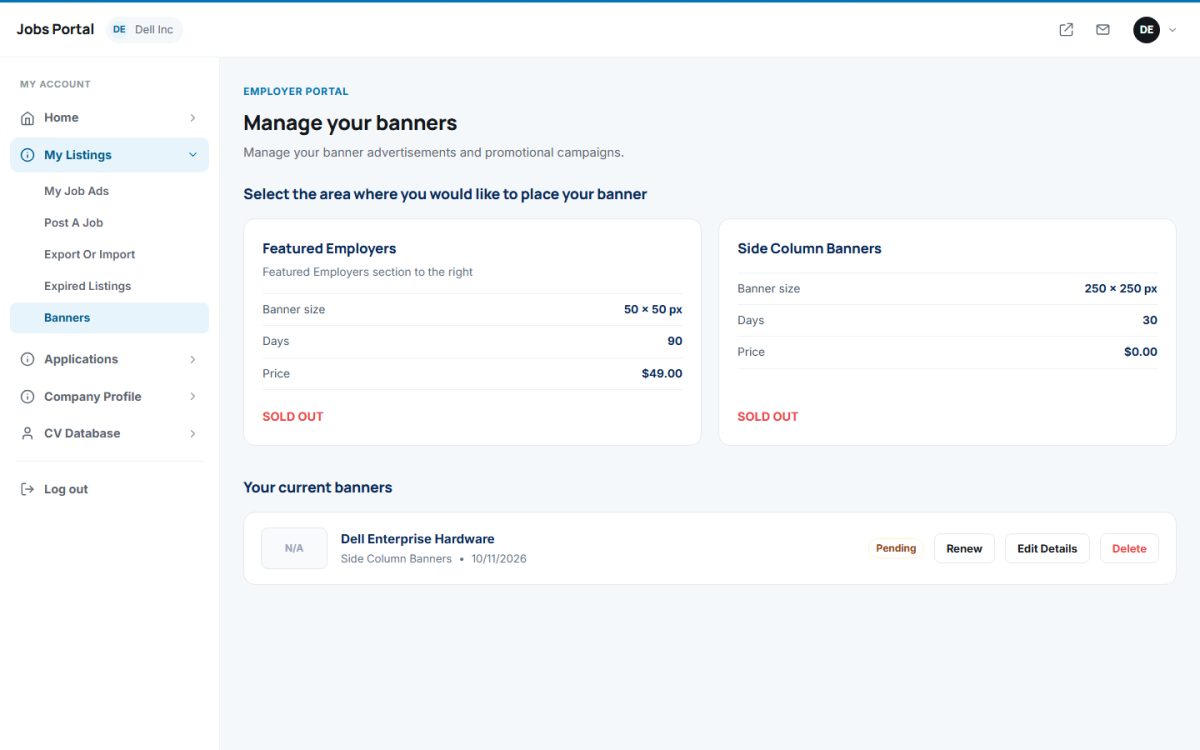
Placing a banner
- Open My Listings → Banners. The page lists the banner areas you created, with the banner size, validity in days, price and whether the area is sold out.
- Choose an available area, enter a banner name, upload the image in the required size and choose the link: a link to the employer’s ads on your site or an external URL.
- Pay if the area has a price (or use credits/subscription banners). New banners usually wait for your approval.
Your current banners
The list shows the area, the status (Pending, Active, Inactive, Expired) and the expiry date. Use Renew to extend a banner, Edit Details to change the image or link and Delete to remove it.
For the administrator
You define the areas, their size, price, maximum number of banners and validity in Banner Areas, and approve or add banners there as well.
Last updated