The employer dashboard
Employers manage their whole hiring process from /EMPLOYERS.
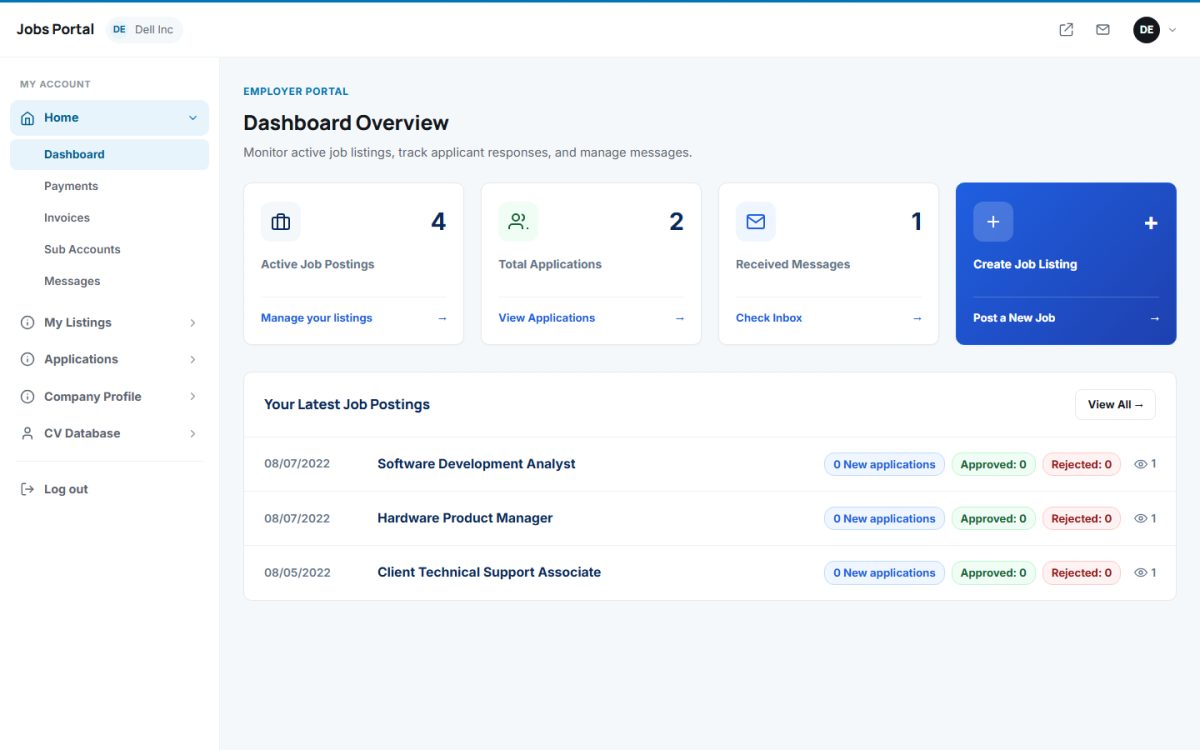
Dashboard overview
- Active Job Postings – the number of live ads, with a link to manage them.
- Total Applications and Received Messages – with links to the applicants list and the inbox.
- Create Job Listing – the highlighted shortcut to post a new job.
- Your Latest Job Postings – every ad with its date, number of new applications and how many were approved or rejected.
The menu
| Section | Pages |
|---|---|
| Home | Dashboard, Payments, Invoices, Sub Accounts, Messages |
| My Listings | My Job Ads, Post A Job, Expired Listings, Export Or Import, Banners |
| Applications | Job Applications, Approved, Rejected |
| Company Profile | Edit Your Profile, Change Password, Logo, Photo Gallery, Video Presentation |
| CV Database | Search, Browse The Resumes |
Which payment pages appear depends on the charging method you chose. If the site is free for employers, the payment pages are not needed.
Messages
Home → Messages shows private messages from jobseekers, for example questions about a job. The employer can read, reply to and delete messages.
Last updated