Managing all car listings
See and control every car on your site from one table.
Admin › Car listings › All listings
The listings table
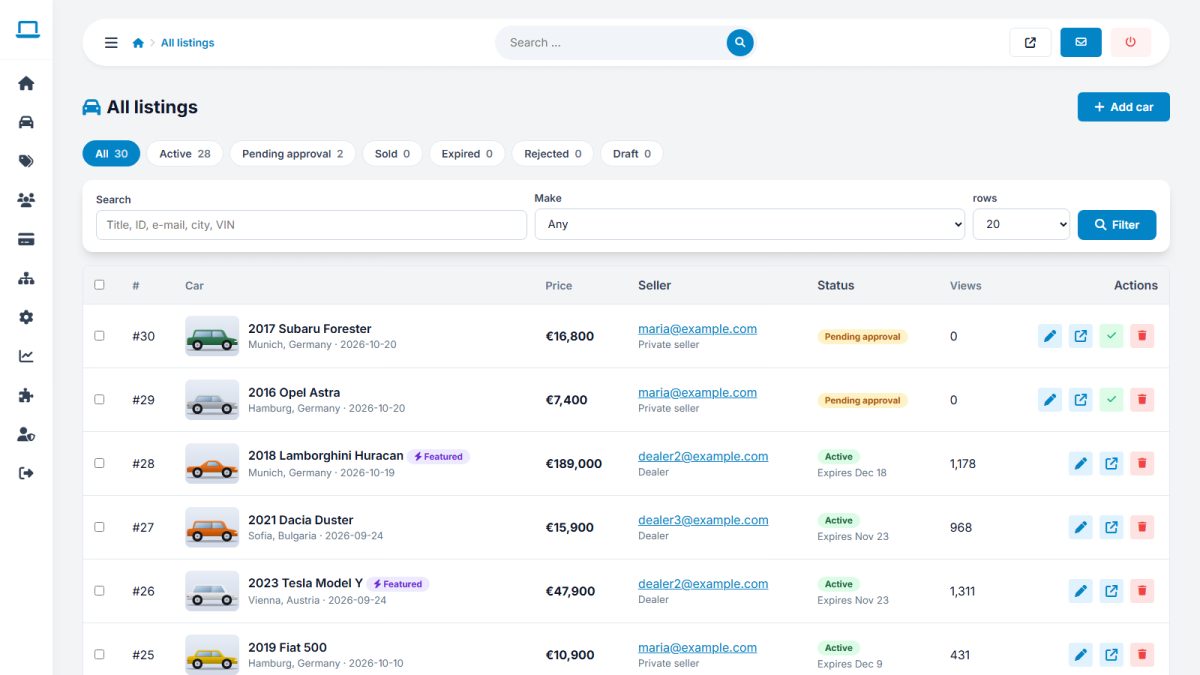
Each row has the photo, title, seller, price, status, featured flag, views and dates. Click a title to edit.
Filtering
Use the bar above the table to filter by status, make, seller, featured and keyword. Filters are kept while you page through results.
Bulk actions
Tick several rows (or the header checkbox) and choose an action:
| Action | Effect |
|---|---|
| Approve | Publishes the cars and starts their duration |
| Make featured / Remove featured | Adds or removes the top placement |
| Mark sold | Moves cars to sold; removed from search |
| Renew | Extends the listing by its normal duration |
| Expire | Ends the listing immediately |
| Delete | Permanently removes cars and their photos (asks for confirmation) |
Single-row actions
Quick buttons on each row let you view the car on the website, edit it, feature it or delete it.
Deleting cannot be undone. Take a backup before large deletions.
Last updated