How to post a car listing
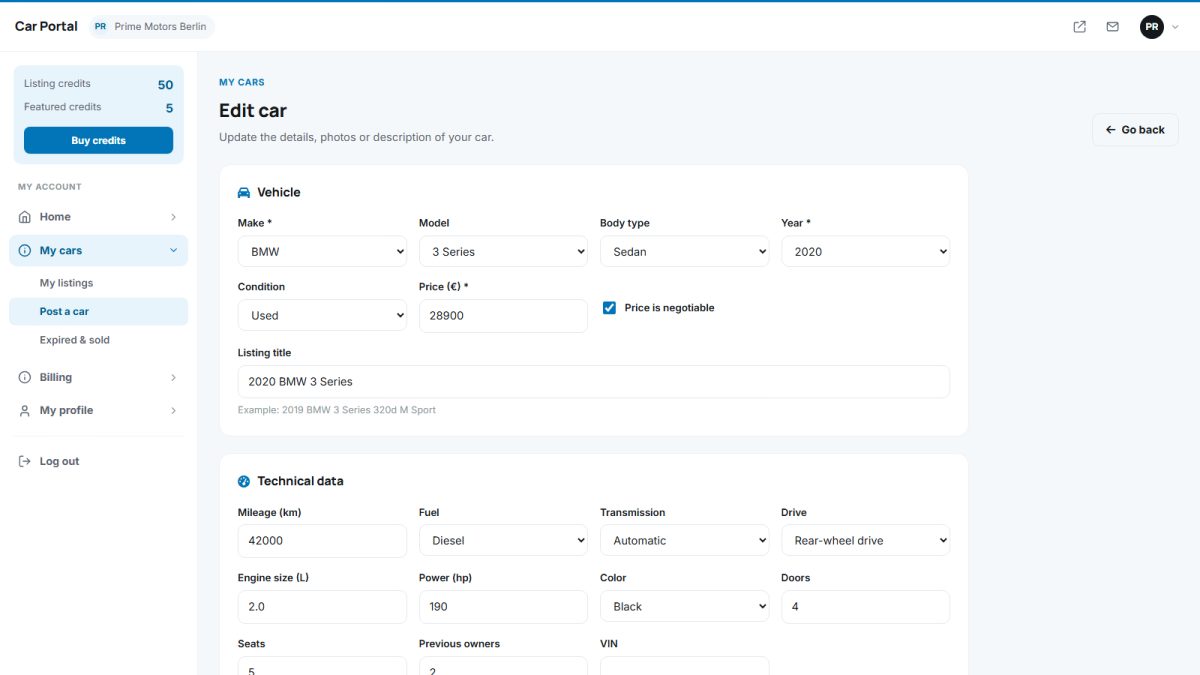
The listing form is organised in clear sections, so even first-time sellers can post a complete ad in a few minutes.
Seller panel › My cars › Post a car
Step by step
- Vehicle. Choose make and model (the model list follows the make), body type, year, mileage, fuel, gearbox, power, drive, colour, doors, seats and condition.
- Price. Enter the asking price and mark it as negotiable if you wish. The currency is set by the site.
- Photos. Drag images into the upload area or click to select. Reorder by dragging and choose the main photo. Large images are resized automatically.
- Equipment. Tick the features the car has, like air conditioning, parking sensors or navigation.
- Description. Write the text yourself with the rich editor, or let the AI writer create it.
- Location and contact. City, phone, WhatsApp number and an optional YouTube video link.
- Save. Choose Save as draft to continue later or Publish to send the car live.
After publishing
- If Publish new listings without approval is on, the car goes live immediately.
- Otherwise the car shows as Pending until an admin approves it. The seller gets an e-mail when it is approved or rejected, with the reason.
- If your site charges for listings, one listing credit is used when the car is published (see buying packages).
Photo limits and duration
The number of photos and the number of days a listing stays online come from the seller’s package, or from the defaults in Listing settings.
Tips for better ads: use at least 8 bright photos including the interior and dashboard, state the service history, and mention any recent repairs. Cars with a complete description get far more enquiries.
Last updated