Set up PayPal payments
Car Portal uses PayPal’s current Orders v2 API, so buyers can pay with PayPal or a card.
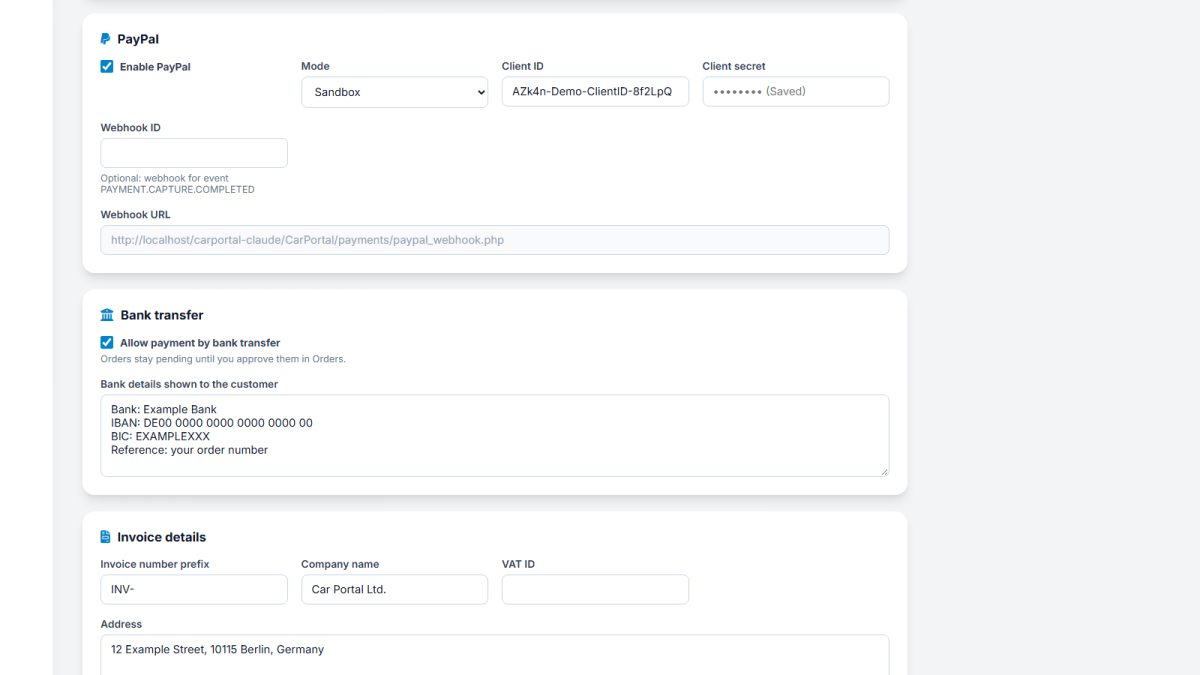
Admin › Payments › Payment settings › PayPal
- Open the PayPal developer dashboard (developer.paypal.com) and go to Apps & Credentials.
- Create an app in Sandbox for testing (and later one in Live).
- Copy the Client ID and Secret.
- Enter them in Car Portal. In Payments › Payment settings › PayPal tick Enable PayPal, choose mode Sandbox and paste the Client ID and Client secret.
- Optional but recommended: webhook. In the PayPal app add a webhook with the URL shown in Car Portal (
https://your-site/payments/paypal_webhook.php) and the eventPAYMENT.CAPTURE.COMPLETED. Copy the Webhook ID into Car Portal.
Test it
Use a PayPal sandbox buyer account (created in the developer dashboard) to pay for a package. The order must turn Paid.
Go live
Create the app in the Live tab, enter its Client ID, Secret and Webhook ID and switch the mode to Live.
Each payment is captured and checked with PayPal on the server, amounts are compared with the order, and an order is fulfilled only once.
Last updated